

CloverDX MCP Bridge
v. 1.0
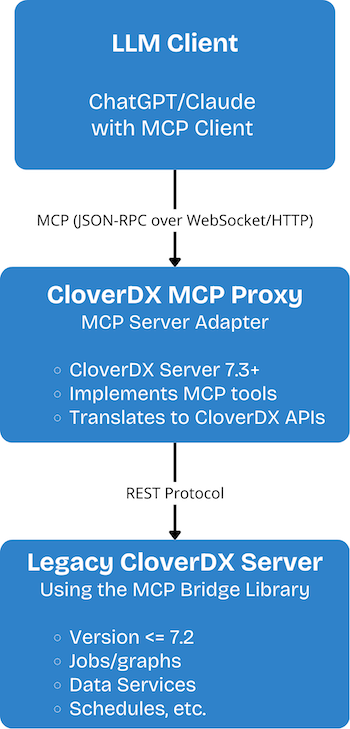
The CloverDX MCP Bridge library provides MCP (Model Context Protocol) functionality for CloverDX Server installations that do not natively support MCP (versions prior to 7.3).
It acts as a compatibility layer, enabling remote MCP operations such as log retrieval, license inspection, job execution tracking, and database access through Data Services exposed by the library.
This library is intended for environments where upgrading CloverDX Server is not immediately possible, but MCP-level monitoring and operational tooling are required.
Description
The library exposes a full set of MCP APIs through Data Services.
After installation, you can run the provided initialization graph, which automatically publishes all MCP Data Services to the target CloverDX Server.
Once initialized, these APIs can be consumed remotely (e.g., via HTTP clients, internal tools, or automated monitoring).
Schema
Properties
Tags
ai mcpThe library exposes the following MCP-compatible Data Services.
Each service mirrors the behavior of the MCP API available in CloverDX 7.3+.
Available MCP Data Services
| Service | Description |
|---|---|
| MCP DatabaseExecutor | Executes SQL queries remotely on configured databases and returns result sets or update counts. |
| MCP DeploymentDescription | Retrieves information about deployed projects, including structure, metadata, and configuration details. |
| MCP ExecutionLog | Provides access to execution logs for jobs, graphs, and scheduled tasks. Supports filtering by execution ID. |
| MCP ExecutionTracking | Returns live and historical execution tracking data, including job statuses, timing, and run statistics. |
| MCP FileContent | Delivers the content of files stored on the server, such as logs or project resources. |
| MCP GrepLogFiles | Searches log files on the server using pattern-based filtering and returns matching lines. |
| MCP LicenseInfo | Exposes current server license details, including license type, expiration date, and feature availability. |
| MCP ReportSupportIssue | Submits diagnostic and environment details for support purposes, replicating MCP’s built-in reporting workflow. |
| MCP RetrievePerformanceLogs | Fetches performance metrics and system-level logs generated by the server for monitoring and diagnostics. |
Initialization Graph
To activate the library, run the PublishDataServices initialization graph.
This graph:
- Connects to the target CloverDX Server using the configured credentials
- Publishes all MCP Data Services included in the library
- Ensures the server exposes a consistent MCP API layer
Initialization Parameters
| Parameter | Label | Description |
|---|---|---|
CLOVER_SERVER_URL |
CloverDX Server URL | Base URL of the CloverDX Server where MCP Data Services will be published. |
CLOVER_SERVER_LOGIN |
CloverDX Server Username | Username used for authentication during service publication. |
CLOVER_SERVER_PASSWORD |
CloverDX Server Password | Password for server authentication (secure parameter). |
Online installation (Server connected to Internet)
- In Server Console, navigate to Libraries > Install library from repository
- Select Library Repository > CloverDX Marketplace
- Check the box next to the library (and any dependencies)
- Click Install
Offline installation (Server without Internet connection)
- Download the required
.clibfiles from the CloverDX Marketplace - Transfer the files to the offline Server machine
- In Server Console, go to Libraries > Install library from repository > (Down arrow) > Browse local files…
- Select the
.clibfiles and install
Post-installation initialization (Required)
After installation, the library must be initialized to activate MCP functionality.
Why initialization is necessary
CloverDX Servers below version 7.3 do not natively expose MCP APIs.
This library provides those APIs through Data Services - but they must be published to the server before they can be used.
How to initialize the library
Run the PublishDataServices initialization graph included in the library.
The graph:
- Connects to your CloverDX Server using the provided parameters
- Publishes all MCP Data Services
Without running this initialization graph, or the MCP endpoints will not be available.
Required parameters for initialization
| Parameter | Label | Description |
|---|---|---|
CLOVER_SERVER_URL |
CloverDX Server URL | Base URL of the CloverDX Server where MCP Data Services will be published. |
CLOVER_SERVER_LOGIN |
CloverDX Server Username | Username used for authentication during service publication. |
CLOVER_SERVER_PASSWORD |
CloverDX Server Password | Password for server authentication (secure parameter). |
Version 1.0
- Initial release providing MCP compatibility layer for CloverDX Server 6.0-7.2
- Includes full MCP Data Service set
- Added initialization graph for automatic Data Service publication